 GymRhythm
The three things people mean by "workout heatmap"
A workout heatmap is a color-coded picture of your training, and the term covers three very different pictures. A muscle heatmap shades a body diagram to show which muscles you've trained. A route heatmap glows brightest along the streets and trails you run or ride most often. A calendar heatmap is a grid of small squares, one per day, that darkens every time you work out. So the right workout heatmap app for you depends entirely on which of those three you were picturing when you searched.
Here's the short version before we go deeper:
- Want to know whether your training is balanced across muscle groups? You want a muscle heatmap, and those live inside rep-logging apps like Hevy and Fitbod.
- Want to see everywhere you've run or cycled? You want a route heatmap, and Strava is the obvious pick.
- Want proof, at a glance, that you're actually showing up week after week? You want a calendar heatmap, the GitHub-style consistency graph.
All three are genuinely useful. Only one of them is about behavior rather than output, and that's the one this guide spends the most time on.
Muscle heatmaps: which muscles you trained
A muscle heatmap is a front-and-back body diagram where trained muscles get shaded in. Hit chest and triceps on Monday and those regions darken. Skip legs for three weeks and the diagram quietly calls you out with two pale columns where your quads should be.
The catch is where the data comes from. A muscle map can only shade what you log, so these heatmaps live inside workout loggers. Hevy draws one from the exercises and sets you enter after each session, so you can see which muscle groups your week actually covered. Fitbod takes a different angle with a recovery map that estimates which muscles are fresh and which are still fatigued, then plans your next workout around it.
If a muscle heatmap is what you're after, be honest with yourself about the workflow it demands. Every exercise has to be logged, every session, or the picture is wrong. Plenty of lifters happily do that, and if that's you, a dedicated logger is the right tool. We compare the main options in our guide to Hevy and Strong alternatives. GymRhythm, the app behind this site, does not do muscle heatmaps at all, and we'd rather tell you that now than after you've downloaded it.
Route heatmaps: where you ran or rode
A route heatmap is a map of your area with your GPS tracks layered on top. Streets you've run once show up as faint lines. Your regular loop burns bright. Over a couple of years it becomes something genuinely beautiful, a personal light map of everywhere your legs have taken you.
Strava owns this category. It offers a personal heatmap built from your own recorded activities and a global heatmap built from the wider Strava community, which is how runners scout popular routes in an unfamiliar city. If you run or ride outdoors and this is the heatmap you want, stop reading and get Strava. It's the right answer.
The limitation is obvious once you say it out loud. Route heatmaps need GPS movement, and a gym session doesn't have any. You walk into a building, move iron around for an hour, and walk out. On a route heatmap that entire workout is a single dot, if it registers at all. Lifters who love the idea of a heatmap need a different shape of graph.
Calendar heatmaps: the consistency graph
A calendar heatmap is the grid GitHub made famous. One small square per day, arranged in weekly columns, colored in whenever you did the thing. Developers know it as the contribution graph. Applied to training, it becomes the most honest chart in fitness: a full year of your gym life in a single glance, gaps and all.
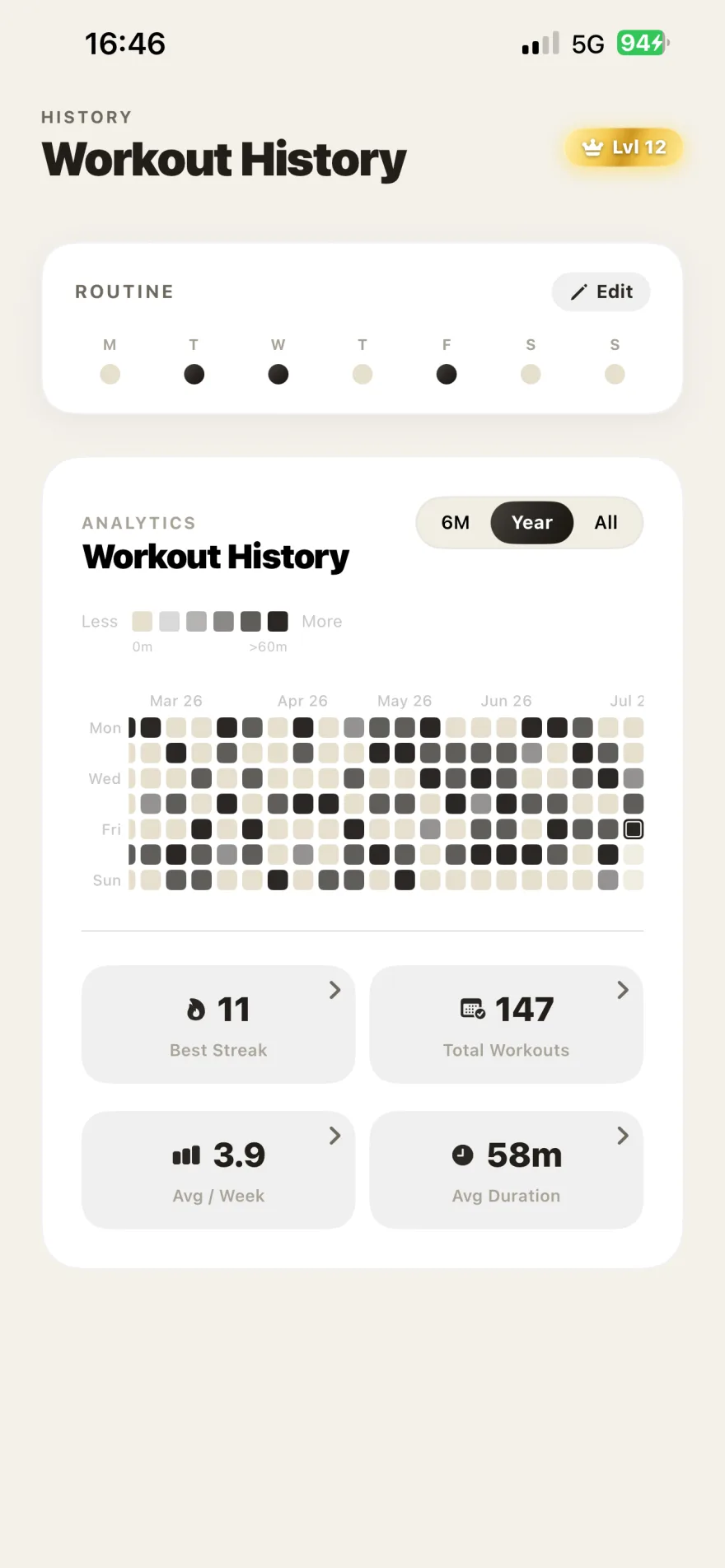
You can get one several ways. Habit trackers like HabitKit draw GitHub-style tiles for anything you manually check off, workouts included. Some people literally commit to a GitHub repo after every session, an approach we cover in our guide to building a GitHub-style fitness tracker. Most workout loggers show a calendar view of logged sessions too. And GymRhythm draws one automatically from detected gym visits, which we'll get to shortly.
Unlike the other two heatmap types, the calendar version doesn't care what you did or where you did it. It tracks exactly one variable: did you show up today. That sounds crude. It's actually the point.
Why the calendar heatmap is the one tied to showing up
Muscle maps and route maps describe your output. They get more impressive when you train harder or explore further. A calendar heatmap describes the habit itself, and the habit sits upstream of everything else. No muscle gets built and no route gets run in the weeks you don't show up.
Research on habit formation suggests that a new behavior becomes automatic through repetition in a stable context, and that this typically takes a couple of months or more, not the three weeks of popular myth. What a calendar heatmap does brilliantly is make that repetition visible while it's still forming. A growing chain of green squares is progress you can see on day nine, long before the mirror shows you anything.
It also recruits a useful bias. Once a visible chain exists, breaking it stings. The "don't break the chain" method, popularly attributed to Jerry Seinfeld, runs on exactly this. An empty square tomorrow is a small, concrete loss in a way that "I skipped the gym" never quite is. If consistency is your real bottleneck, and for most people it is, this is the heatmap worth having on your phone. We dig into the underlying system in how to be consistent with the gym.
There is one structural weakness. Almost every calendar heatmap runs on manual check-ins, and the days you forget to tap are the days the graph lies. Skip logging on a real gym day and your streak breaks on paper. Let that happen twice and you stop trusting the chart, and a consistency graph you don't trust stops changing your behavior.
Workout heatmap apps compared
Here's how the main options line up once you know which question you're actually asking.
| App | Heatmap type | What fills it in | Best for |
|---|---|---|---|
| Hevy | Muscle heatmap | Exercises and sets you log by hand | Lifters checking muscle balance |
| Fitbod | Muscle recovery map | Logged workouts plus its recovery model | Lifters who want the app to plan sessions |
| Strava | Route heatmap | GPS tracks from runs and rides | Runners and cyclists training outdoors |
| HabitKit | Calendar heatmap | Manual daily check-ins | Tracking any habit, gym included |
| GymRhythm | Calendar heatmap | Automatic geofence-detected gym visits | Gym-goers whose real battle is showing up |
A few honest notes on that table. Hevy and Fitbod are excellent at what they do, and if sets and reps are the data you care about, pick one and don't look back. Strava is unbeatable for outdoor cardio. HabitKit is a lovely general-purpose habit tracker that happens to draw great tiles, but it only knows what you remember to tell it, a tradeoff we unpack in our roundup of gym habit tracker apps. GymRhythm is the narrow specialist of the group: it tracks gym attendance and nothing else, and it's iPhone only.
A heatmap that fills itself in
GymRhythm exists because of that manual check-in weakness. You pin your gym on a map once, set a radius around it, and the app uses Apple's geofencing to notice when your iPhone arrives and leaves. Each visit is logged automatically with its arrival time and duration. Your GitHub-style year heatmap, your streak, and your weekly goal, measured in gym days per week, all update on their own. You can pin more than one gym if you split time between locations.
Around the heatmap it builds the stats that make consistency interesting: your average session time, routine insights showing which weekdays you actually train, and a 50-level XP system where leveling up unlocks real features like advanced analytics and dark mode. When the graph looks good, you can share it as a stat card.
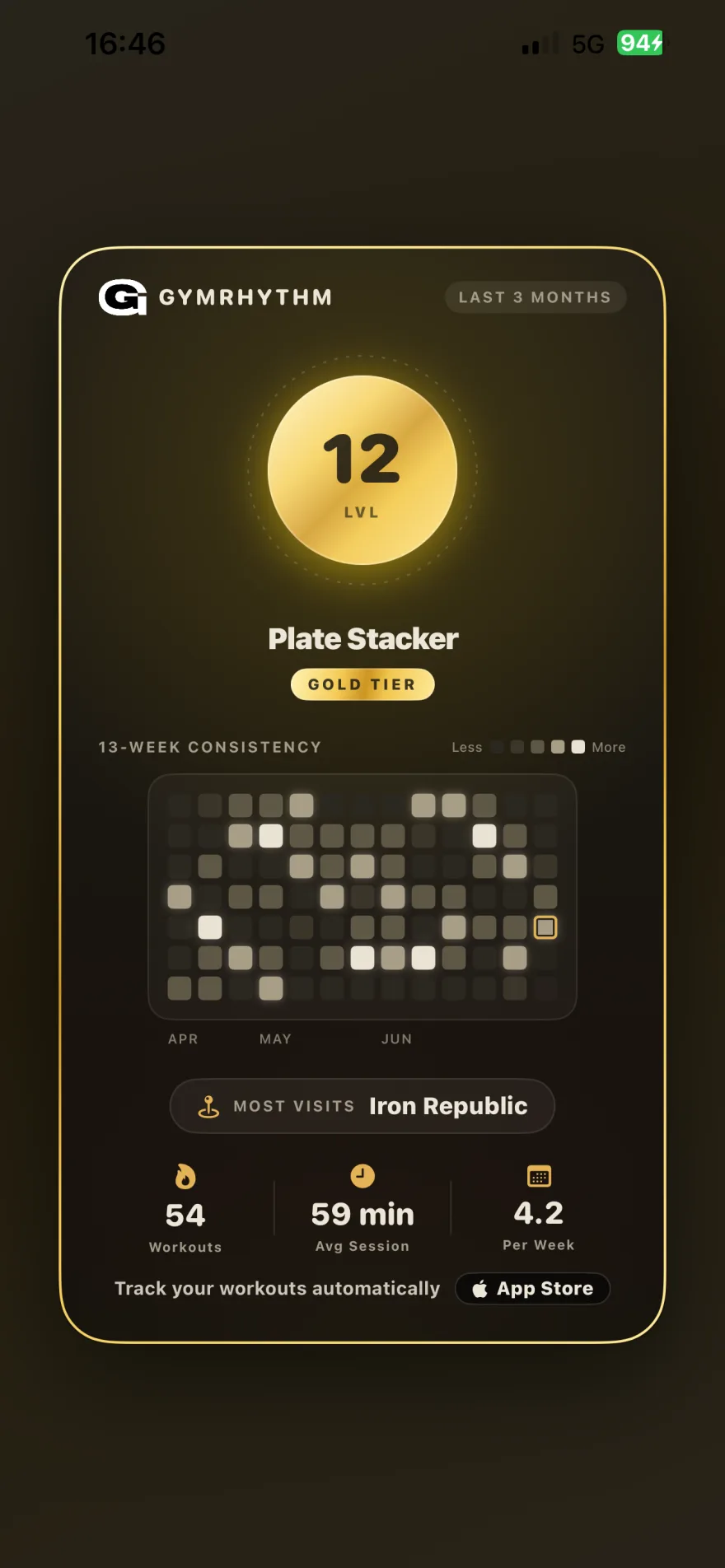
To be equally clear about what it doesn't do: GymRhythm has no idea what happened inside the gym. No sets, no reps, no exercises. Plenty of people run it alongside Hevy, one app for the showing up and one for the lifting. It's free to download with a premium subscription for full access, and there's no Android version or Apple Watch app. If you want the full picture of how automatic detection works, our guide to apps that track gym visits walks through it step by step.
So, which workout heatmap app should you get? Ask what you're actually trying to see. Muscle balance points you to Hevy or Fitbod. Outdoor miles point you to Strava. But if the honest answer is "I want proof that I keep showing up," get the calendar heatmap that fills itself in when you walk through the door. A year from now, scrolling back over all those green squares, you'll be glad every one of them is real.