 GymRhythm
Why gym habits die at the check-in step
The short answer: the best gym habit tracker app is the one that logs your visit even when you forget to. Manual check-in apps like GymStreak Habit Tracker, Gym Commitment and nuumi work well if you'll reliably tap a button after every single session. If you know you won't, an automatic tracker like GymRhythm detects the visit itself, so your streak reflects what you actually did.
Here's the thing nobody tells you about habit trackers. The tracking is a second habit stacked on top of the first one. Go to the gym, then remember to open an app and mark the day. That works fine in week one, when the whole project still feels shiny.
It falls apart around week five. You drag yourself to the gym after a rough night, grind through a session on autopilot, and drive home thinking about dinner. The check-in never happens. Next morning your streak reads zero, and the app is telling you that you failed on a day you showed up.
Research on habit formation suggests new behaviors take roughly two to eight months of repetition before they feel automatic, far longer than the popular "21 days" myth. Your tracker has to survive months of tired, distracted, low-motivation days. Those are precisely the days a manual check-in gets forgotten, and a tracker that punishes you for forgetting is working against the habit it's supposed to build.
The best gym habit tracker apps compared
Every app in this table can track a gym habit. The real difference comes down to one design decision: who does the logging, you or the app.
| App | How a visit gets logged | Built for | What breaks the streak |
|---|---|---|---|
| GymStreak Habit Tracker | You tap to check in | Gym visits | Not going, or forgetting to tap |
| Gym Commitment | You tap to check in | Gym visits | Not going, or forgetting to tap |
| nuumi | You check in manually | Gym visits | Not going, or forgetting to tap |
| Streaks | You tap, some health tasks auto-complete via Apple Health | Any habit | Not doing it, or forgetting to tap |
| HabitKit | You tap to fill a tile | Any habit | Not doing it, or forgetting to tap |
| GymRhythm | Automatic, via a geofence around your gym | Gym visits | Only actually not going |
One important scope note before we go deeper. None of these apps log sets, reps or weights, and neither does GymRhythm. If logging your actual lifts is what you're after, you want a dedicated workout logger like Hevy or Strong instead. They're excellent at that job, and we look at when you actually need one in our guide to Hevy and Strong alternatives.
Manual check-in apps: GymStreak Habit Tracker, Gym Commitment and nuumi
These three rank for gym habit searches because they do one clear thing. You went to the gym, you tap, the calendar fills in. No workout logging to slow you down, just attendance.
GymStreak Habit Tracker keeps it minimal. One tap per gym day, a streak counter that climbs, a calendar that fills in behind it. If you want the least possible friction in a manual app, this is the shape of it.
Gym Commitment is built around the promise you make to yourself. You set your attendance goal, then check in each time you actually go, and the app holds the record of how you're doing against it.
nuumi is a newer take on the same loop, a gym check-in tracker with a softer, friendlier presentation. The core mechanic is unchanged: you confirm the visit by hand, the app keeps the chain.
All three are perfectly reasonable apps if tapping a button is something you will genuinely do after every visit. Be honest with yourself about that. Three gym days a week is roughly 150 taps a year, and every one of them has to happen on a day when your brain is fried from training. Miss one and the record is wrong.
Love Streaks or HabitKit? What a gym-specific tracker adds
Plenty of people searching for a gym tracker already use a general habit app and wonder whether a "gym" habit inside it is enough. Sometimes it is.
Streaks, the iOS habit app polished enough to have won an Apple Design Award, can auto-complete certain tasks from Apple Health data, things like minutes of exercise or a closed activity ring. But a gym visit is not something Apple Health records, so a "go to the gym" task falls back to manual taps. We dig into that gap in does Apple Watch track gym visits.
HabitKit gives every habit a GitHub-style tile grid, which is a genuinely great visual for consistency. Each tap fills a square, and a good month looks satisfyingly green. If that grid is the thing you love, there's a gym-specific version of the idea, covered in our guide to GitHub-style fitness trackers.
So what does a gym-specific tracker add over a general one? Context. A general habit app records "done" and nothing else. A tracker built around gym attendance can record when you arrived, how long you stayed, your average session length, and which days of the week you actually train. That last one matters more than it sounds. Seeing that you always train Monday and Wednesday but lose Fridays tells you exactly where your routine is fragile.
Streaks that don't lie: automatic vs. tap-to-check-in
A streak only motivates you if you trust it. The first time your tracker shows a broken chain on a week you know you trained, something quietly shifts. The number stops being a record and becomes an approximation, and approximations are easy to ignore.
There's a nastier version of this too. Research on self-control suggests that a broken commitment can trigger an all-or-nothing slump: miss once, feel like the streak is ruined anyway, then miss again. A falsely broken streak can kick off that spiral on a week where you did nothing wrong.
To be fair, manual check-ins have real advantages. They work anywhere, home workouts, park runs, hotel gyms with no fixed location. They need no location permission and no battery budget. And some people genuinely like the small ritual of the tap. If your training doesn't happen in one fixed place, a manual app is honestly the right tool, and you should pick one from the list above.
But if your training happens at a gym, the visit is a physical, location-bound event. Your phone already knows you're there. Making you confirm it by hand is a leftover from habit apps that also had to handle flossing and journaling. Automatic check-in removes the one step that fails on tired days, which means the streak on screen is the streak that actually happened.
How GymRhythm checks you in automatically
Full disclosure: GymRhythm is my app. I built it after breaking streaks in habit apps on days I had actually trained, and I'd rather explain exactly how it works than oversell it.
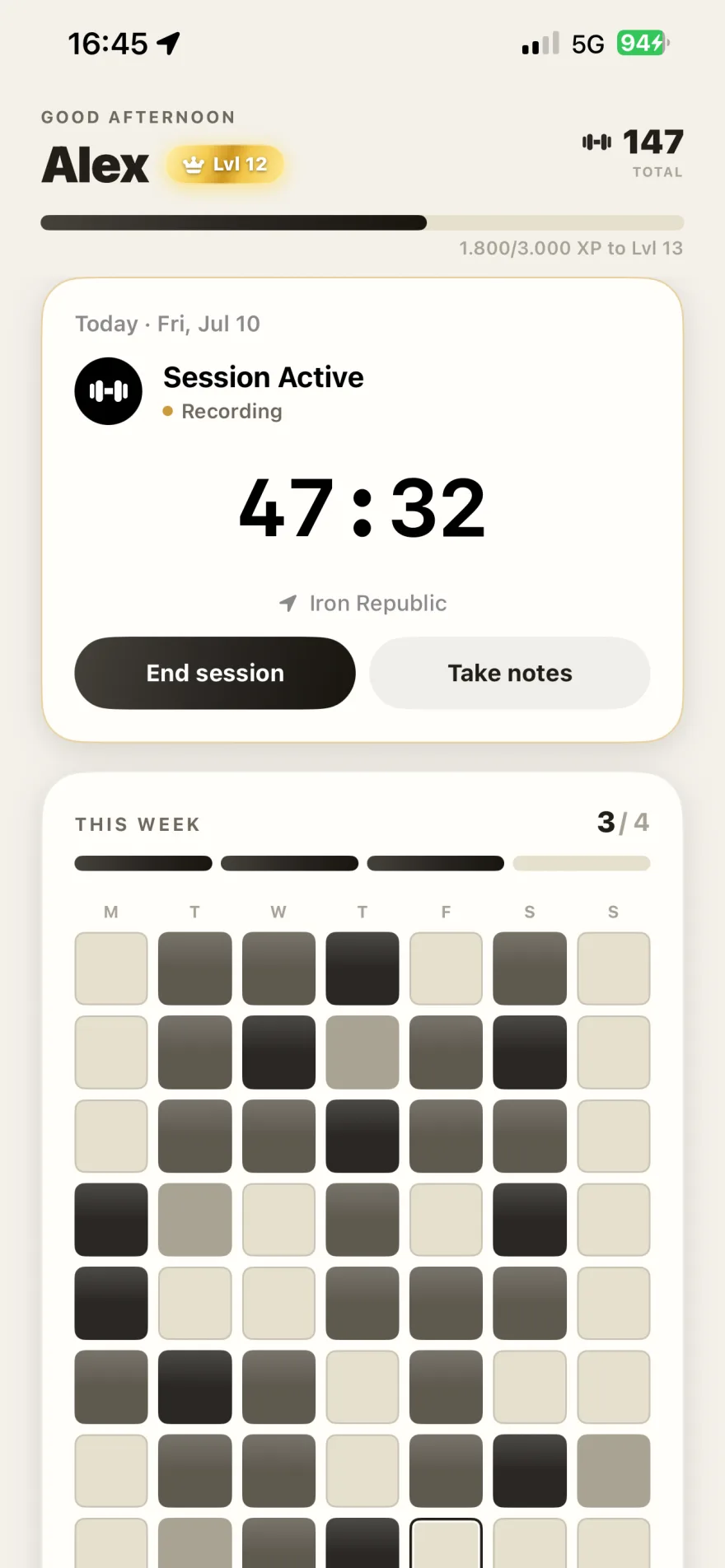
Setup takes about a minute. You pin your gym on a map, set a radius around it, and you're done. You can pin multiple gyms if you split time between locations. From then on, GymRhythm uses Apple's geofencing to notice when your iPhone enters that radius. When you arrive, the session starts. When you leave, it's saved with your arrival time and duration. There's no button anywhere in that flow.
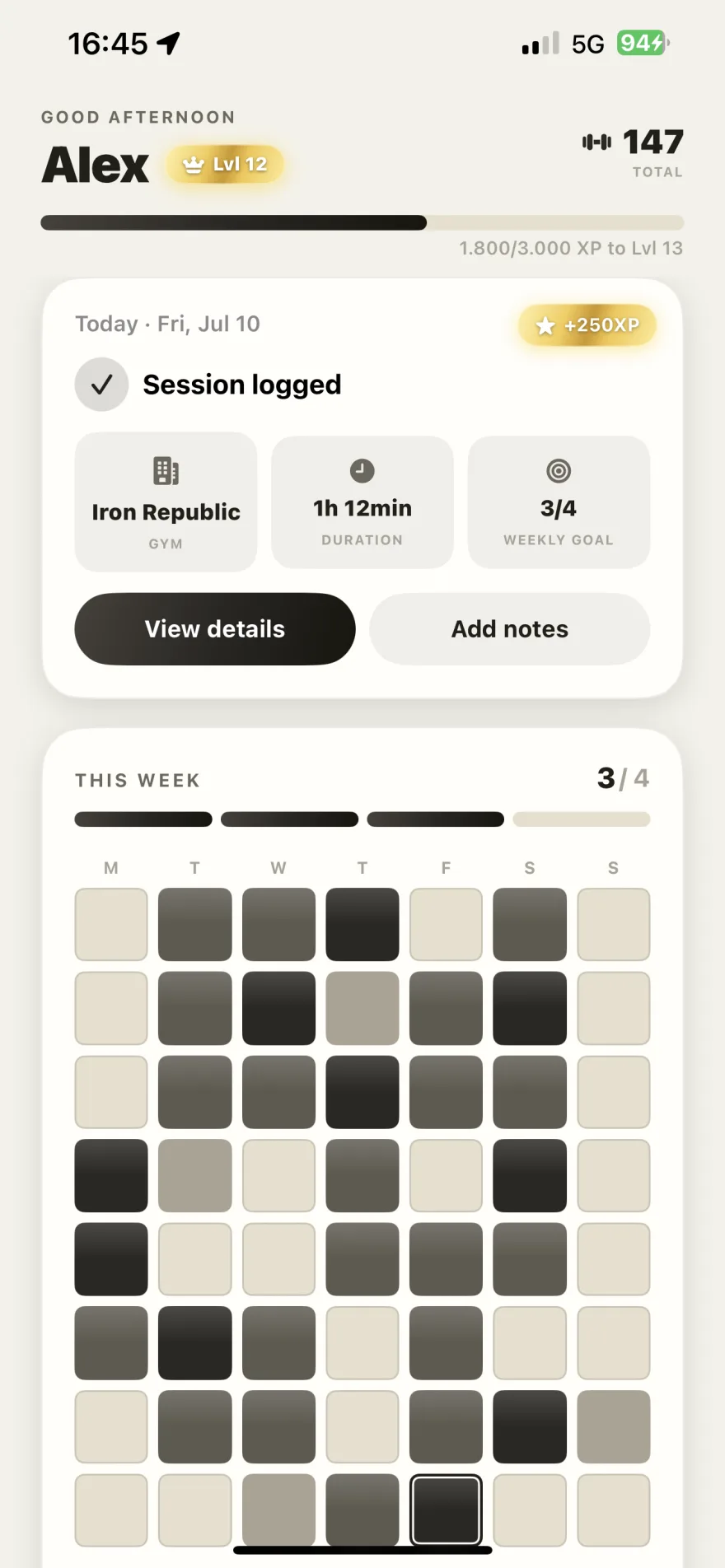
The logged visits feed everything else. You get streaks, a weekly goal measured in gym days per week, a GitHub-style heatmap of your whole year, your average session time, and routine insights that show which weekdays you actually train. Counting days instead of sessions is deliberate, by the way. Two visits in one day is still one day of showing up, so the goal can't be gamed. There's also a 50-level XP system where levels unlock real things like advanced analytics and dark mode, plus shareable stat cards when you hit something worth showing off.
And what it doesn't do, so there are no surprises: no sets, reps, weights or exercise logging, no workout plans, no calorie tracking. It's iPhone only, with no Android version and no Apple Watch app. It's free to download on the App Store, with a premium subscription for full access. If you want the deeper dive into automatic attendance tracking, read our guide to apps that track gym visits.
Which tracker fits which person
Different searchers land on this page wanting different things, so here's the honest routing table.
- You want to log sets, reps and weights. Get Hevy or Strong. They're workout loggers, not habit trackers, and no app on this page replaces them.
- You track many habits and the gym is just one of them. Streaks or HabitKit will serve you well. Just accept that the gym entry stays manual.
- You train at home or outdoors. Geofencing can't help you. Pick a manual check-in app and put the tap in your post-workout routine.
- Forgetting is the whole problem. If ADHD or a chaotic schedule keeps eating your check-ins, removing the step entirely changes the game. We wrote about that in gym consistency with ADHD.
- You train at a gym and want the record to be effortless and true. That's GymRhythm.
One last thing worth saying plainly. No gym habit tracker app will drag you to the squat rack. What a good one does is make showing up visible, so that on the days motivation is gone, the chain you've built does the arguing for you. The tracker is one piece of a larger system, and if you want the rest of that system, start with our guide on how to be consistent with the gym.