 GymRhythm
The easiest app to track gym visits is one that does the tracking for you. On iPhone that means geofencing: you pin your gym on a map once, and the app logs every visit automatically with your arrival time and how long you stayed. Every other method, a calendar, a check-in app, your gym chain's member app, works too, but only for as long as you remember to do something after every single session.
This guide compares all four approaches honestly, including the cases where the simpler ones are the better pick. By the end you'll know exactly how to answer the question that probably sent you here: how many times did I actually go?
What tracking gym visits actually means (visits, days, duration)
"Tracking gym visits" sounds like one thing, but it's really three numbers:
- Visits. Each time you walk through the door. The raw count.
- Gym days. How many days per week you trained. This is the consistency metric, and as we'll get to below, it's the one that actually predicts progress.
- Duration. How long each session lasted. Useful for spotting drift, like when your "one hour" workouts have quietly become 40 minutes.
Notice what's not on that list: sets, reps, weights, exercises. If you want to record what you did inside the gym, an attendance tracker is the wrong tool, and a dedicated workout logger like Hevy or Strong will serve you far better. We wrote about when you actually need a rep logger if that's your situation. Visit tracking answers a different question: did you show up, when, and for how long.
One more thing before we compare tools. Your memory is bad at this. Not yours specifically, everyone's. Ask people how often they trained last month and most will report their intended frequency, not their real one. That gap between the plan and the record is exactly why tracking attendance is worth doing at all.
Option 1: A calendar or notes app
The oldest method still works. Open your calendar after each workout and drop in a "Gym" event, or keep a running list in Apple Notes. It's free, there's nothing to learn, and your data lives somewhere you already trust.
The problems show up over time. Counting visits means scrolling back and tallying by hand. There's no duration unless you type it in. And the whole system runs on you remembering to log after every session, which is precisely the kind of tiny chore that evaporates on a busy day. Miss a few entries and your record stops being a record. It becomes a rough sketch that undercounts your effort.
Verdict: fine for a month, frustrating for a year. Best for people who already live in their calendar and only want a loose sense of frequency.
Option 2: Manual check-in apps
One step up is a habit tracker where you tap a button after each visit. Apps like Streaks and Habitify do this well, adding streak counters and simple charts that a calendar can't give you. Many support reminders too, which patches over the forgetting problem a little.
The weakness is the same one, just better dressed. Your data is only as complete as your tapping. Forget twice during a heavy training week and the app now says you barely went. Worse, streak features end up punishing you for forgetting to log rather than for forgetting to train, which is backwards. A 60-day streak that dies because you fell asleep before tapping a button teaches you to resent the app, not to show up more.
If you're weighing up this category, we compared the main contenders in our guide to gym habit tracker apps, including which ones handle missed logs gracefully.
Option 3: Your gym chain's member app
If you scan a card or QR code at the entrance, your gym already has a record of every visit. Many large chains, Planet Fitness, PureGym, and Basic-Fit among them, surface that check-in history somewhere inside their member app.
When it works, it's genuinely automatic and accurate. But there are catches. Most chains record the entry scan only, so there's no duration. The history screen tends to be buried under class bookings and upsell banners, with no streaks, goals, or long-term stats built on top of it. And your data is locked to that one chain. It can't see the hotel gym you used on a work trip, and if you ever switch memberships, your entire history stays behind. It's a billing receipt that happens to double as a tracker.
Verdict: check what your gym's app actually shows before relying on it. If it presents a clean visit history and a bare list is all you want, you may already be done. Most people find it's a list, not an answer.
Option 4: An app to track gym visits automatically with geofencing
The fourth option removes the human from the loop entirely. Geofencing uses your iPhone's built-in region monitoring. You drop a pin on your gym, set a detection radius, and iOS quietly notices whenever you enter or leave that circle. The app doesn't keep GPS running, so the battery impact stays small. When you cross in, a session starts. When you leave, it ends, and the visit is saved with arrival time and duration attached.
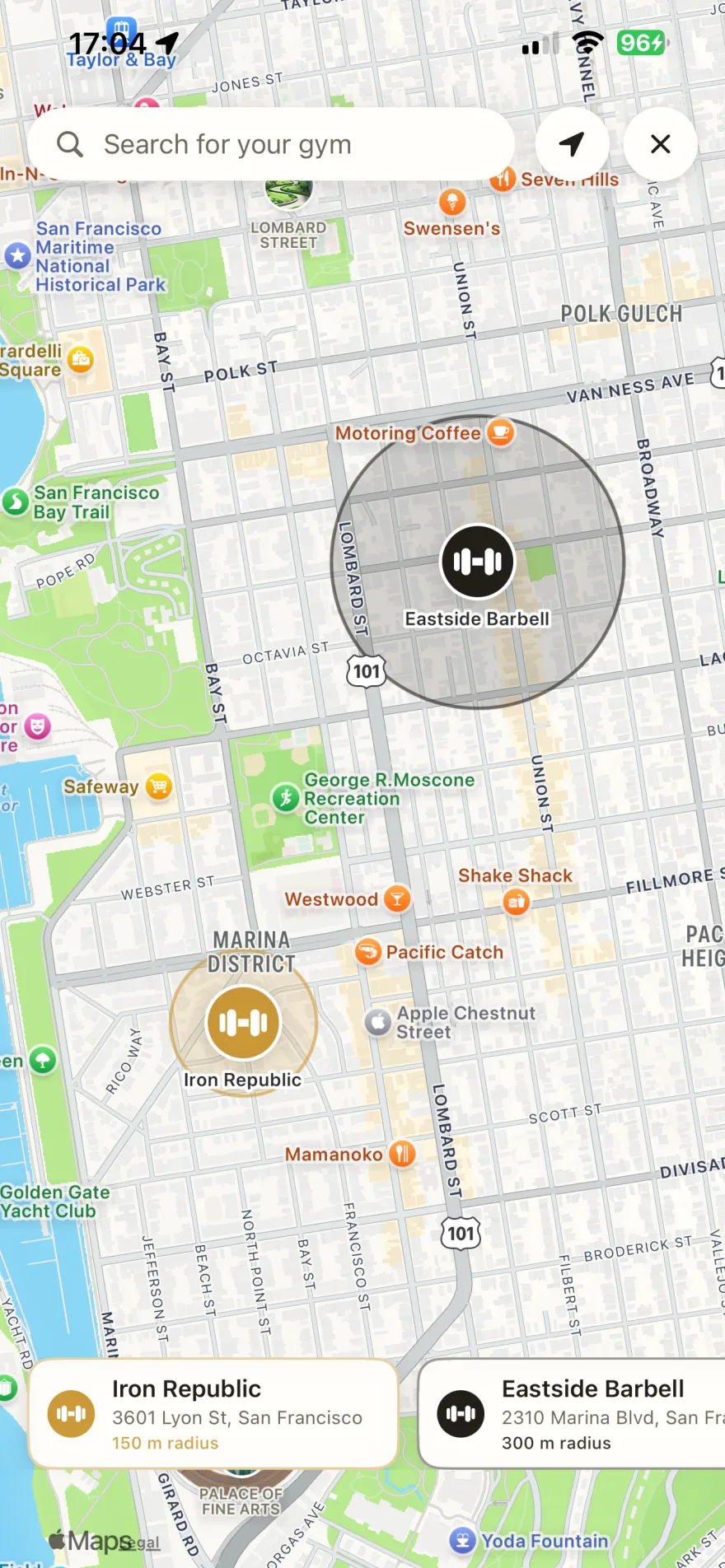
Setup takes about a minute per gym, and you can pin several. Your main gym, the one near the office, the one in your hometown. After that there is nothing to remember, ever. You show up, it counts.
Honesty requires the fine print. Background detection needs the "Always" location permission, which is a real ask and worth understanding before you grant it. The radius matters too. Set it too wide on a dense shopping street and a long coffee next door could register as a visit, which is exactly why being able to adjust the circle yourself is important. Placed sensibly, detection is very reliable, but it's detection, not a door scan.
One aside, since people often ask here: Apple Watch doesn't solve this. It logs workouts you start, not places you went, and a "Traditional Strength Training" session started in your living room counts the same as one at the gym. We covered the details in does Apple Watch track gym visits.
Here's how the four methods stack up:
| Method | Effort per visit | Captures duration | Weak spot |
|---|---|---|---|
| Calendar or notes | Manual entry | Only if you type it | Forgotten entries, counting by hand |
| Check-in app | One tap | Rarely | Streaks die on missed taps |
| Gym chain app | None | Usually not | One chain only, data locked in |
| Geofencing app | None after setup | Yes, automatically | Needs location permission and a sensible radius |
Counting gym days per week: the metric that predicts progress
Once visits log themselves, the interesting question changes from "did I go" to "how consistently do I go". If you came here looking for an app to count gym days, this is the part that matters, because the number worth watching is days per week, not total sessions.
The distinction sounds pedantic but isn't. Train in the morning and come back for cardio in the evening, and that's two sessions but one day of showing up. Counting it as two flatters your week and hides a skipped day somewhere else. Research on habit formation suggests that repeating a behavior in a consistent context is what makes it automatic, and "days I trained" maps onto that far better than a raw session count does.
That's why GymRhythm's weekly goal counts days, not check-ins. Set a target of three days and a double session on Monday still leaves two to go, which is honest in the way a good training partner is honest. Three days a week is plenty for most people, by the way, and we broke down the evidence in is going to the gym 3 times a week enough.
Duration completes the picture. Because every visit gets stamped in and out, you see your real average session time instead of a guess, plus which weekdays you actually train on versus the ones you only plan to. If you're curious where your number lands, we looked at the typical range in average gym session length.
How many times did you go this month or year? The heatmap answer
Every method in this guide can eventually answer "how many times did I go". But an app that tracks how many times you go to the gym should answer it in one glance, and only one format does: a GitHub-style heatmap. One square per day, filled in when you trained.
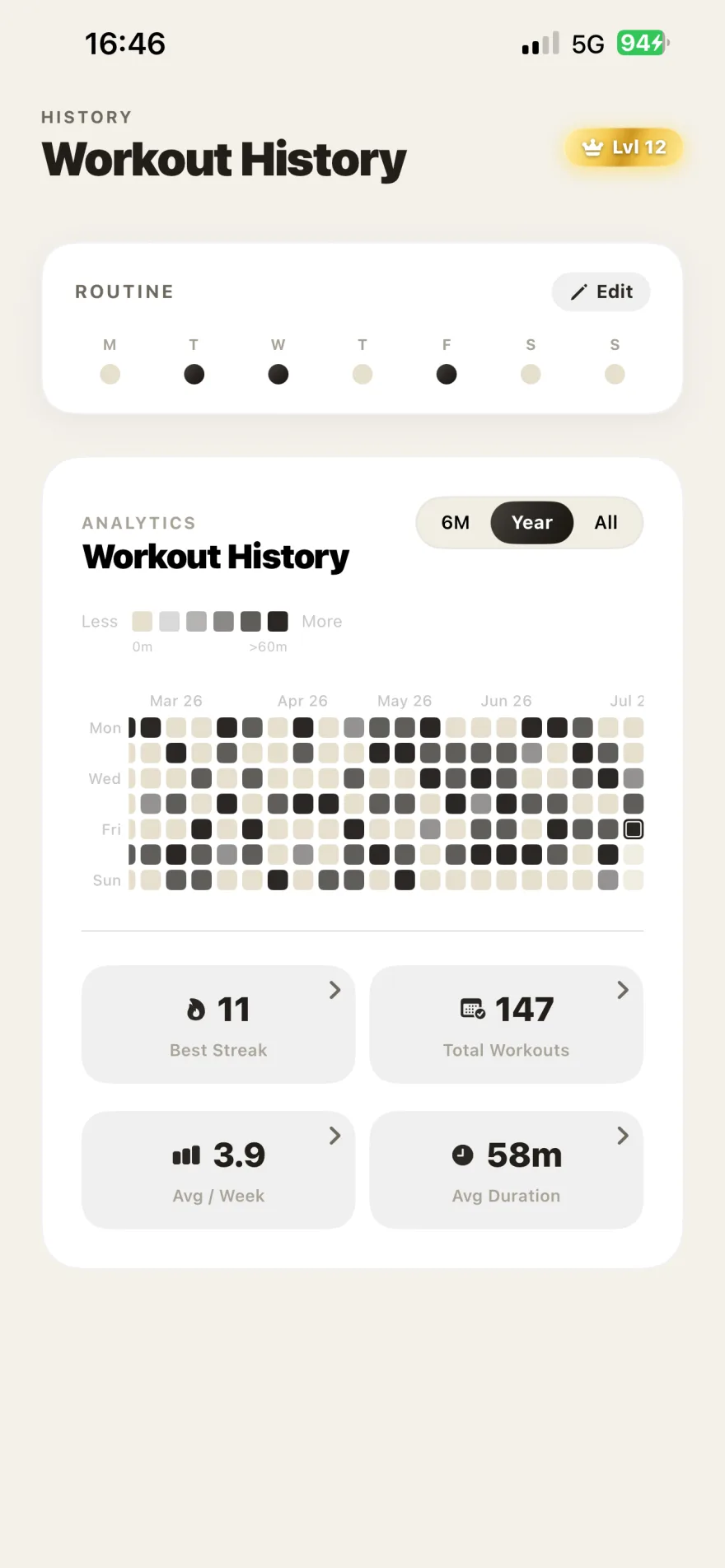
A whole year of attendance compresses into a single picture. Strong months look dense. That two-week gap in March is right there, and so is the streak you rebuilt after it. Developers have loved this view for years because it makes consistency impossible to ignore, and it works just as well for training. In GymRhythm the grid sits next to your current streak, total visits, and average session time, and when a milestone is worth showing off you can share it as a stat card. We went deeper on why the format works in GitHub-style fitness trackers.
So here's the honest summary. If you enjoy manual logging, a calendar or a check-in app will do the job for exactly as long as your discipline holds, and for some people that's genuinely forever. But if you searched for an app to track gym visits because you want the count without the chore, automatic detection is the answer. GymRhythm is that app for iPhone. Pin your gym once, and every visit, gym day, and streak counts itself. It's free on the App Store, and your calendar can go back to holding dentist appointments.