 GymRhythm
Yes, GitHub-style fitness trackers exist, and you have three realistic options. You can build one yourself from open-source repos, you can use a habit tracker app that shows a contribution-style grid and tap a square every time you train, or you can use GymRhythm, an iPhone app that fills the grid automatically the moment you walk into your gym.
All three give you the same satisfying artifact: a year of training compressed into a wall of green squares. Where they differ is the one thing that matters more than any feature list, and that is who does the committing. This guide walks through each option honestly, including the ones I don't make.
Why the contribution graph works on your brain
If you write code, the GitHub contribution graph has already trained you. A green square is a tiny, instant reward. A gray square in the middle of a green run feels genuinely bad, wildly out of proportion to what it actually represents. Research on habit formation suggests this is loss aversion doing the heavy lifting. Once a streak exists, protecting it becomes its own motivation, separate from whatever goal started it.
The graph also does something most fitness stats can't. It compresses a whole year into a single glance. You don't see one workout, you see a pattern, and patterns are what actually change your body. A mediocre Tuesday session earns a full green square, which is exactly right, because over months and years, showing up consistently beats occasional heroics.
That's why this format fits the gym so well. It measures the one binary that matters most: did you go or didn't you. The programming, the weights, the protein, all of it only compounds if that binary keeps coming up true. If you want the full system behind that idea, I wrote a separate guide on how to be consistent with the gym.
The DIY route: open-source trackers on GitHub
The most developer-brained solution is to use the actual GitHub graph. Some people create a repo called "gym" or "workouts" and push one commit every day they train, often just a date appended to a log file. Your real contribution graph then doubles as your gym tracker, and you can automate the push with an iOS Shortcut or a one-line script. It works, it's free, and there's something honest about your gym log living next to your code.
One level up from that are the heatmap generator projects. Search GitHub for "calendar heatmap" or "contribution graph generator" and you'll find libraries in JavaScript, Python, and Swift that turn a list of dates into a contribution-style grid. Feed one a CSV of your gym days and you get a green wall you can embed in a profile README or a personal dashboard. Some people pipe in date exports from workout loggers to backfill months of history.
There are also complete open-source habit trackers. Loop Habit Tracker is a well-known free option with a solid visual history, though it's Android only, so it's out if you're on iPhone. Before you commit a weekend to any of this, the honest downsides of the DIY route:
- You are the backend. Scripts break, repos go stale, and maintaining the tracker slowly becomes a second hobby.
- Data entry still happens at the gym. Phone in the locker, sweaty hands, and the commit quietly never happens.
- No context. A bare commit records that you went, but not when you arrived or how long you stayed.
Manual check-in apps with a contribution grid
If you'd rather not run infrastructure, plenty of habit trackers now ship a GitHub-inspired grid. Everyday is the purest example, since its whole interface is a wall of squares with one row per habit, and you tap a square when you've done the thing. General-purpose trackers like Streaks and Habitify can log "went to the gym" alongside your other habits and show how your year is going. For a gym habit specifically, I compared the strongest options in the gym habit tracker apps guide.
One clarification while you compare, because "heatmap" means three different things in fitness apps. There are calendar heatmaps like the GitHub grid, muscle heatmaps that color a body diagram, and route heatmaps like Strava's. I broke down which apps do which in the workout heatmap apps guide.
And if what you actually want is to log sets, reps, and weights, a habit grid is the wrong tool entirely. Get a proper workout logger. Hevy and Strong are both excellent at that job and both mark your training days on a calendar. I compare them honestly in the Hevy and Strong alternatives guide. GymRhythm doesn't log exercises and doesn't pretend to.
The catch: green squares you have to remember to fill
Every option so far shares one structural flaw. The square only turns green if you remember to turn it green. That sounds trivial until you've lived it.
The failure mode goes like this. You train hard on Thursday, forget to check in, and wake up Friday to a gray square. Now the graph is lying to you, and the streak that was supposed to motivate you just punished you for a workout you actually did. Let that happen twice and most people quietly stop trusting the graph, and a graph you don't trust motivates nothing.
The opposite failure is worse. Nothing stops a couch check-in. When filling the square costs one tap from anywhere, green stops meaning "I trained" and starts meaning "I tapped." Here's how the three approaches stack up:
| Approach | How a square turns green | What breaks |
|---|---|---|
| DIY repo or script | You push a commit or run a script | Forgotten commits, broken automation, no visit details |
| Manual check-in app | You tap a check-in button | Forgotten taps erase real streaks, couch taps fake them |
| Geofenced tracker | Your iPhone detects you arriving at the gym | Needs location permission, iPhone only |
Geofencing: a GitHub-style fitness tracker where walking in is the commit
Geofencing closes that gap. It's a built-in Apple technology that lets an app register a small circle on the map and get notified when your phone enters or leaves it, designed to be gentle on battery. No wearable required. And no, this is not something your Apple Watch does for gym attendance out of the box, which surprises a lot of people. I covered that one in does Apple Watch track gym visits.
This is the idea GymRhythm is built on. You pin your gym on a map once, set a radius around it, and you're done. You can pin multiple gyms if you split time between locations. From then on, walking through the door is the commit. The app logs each visit with your arrival time and duration, and the year heatmap fills itself in, one honest green square per gym day.
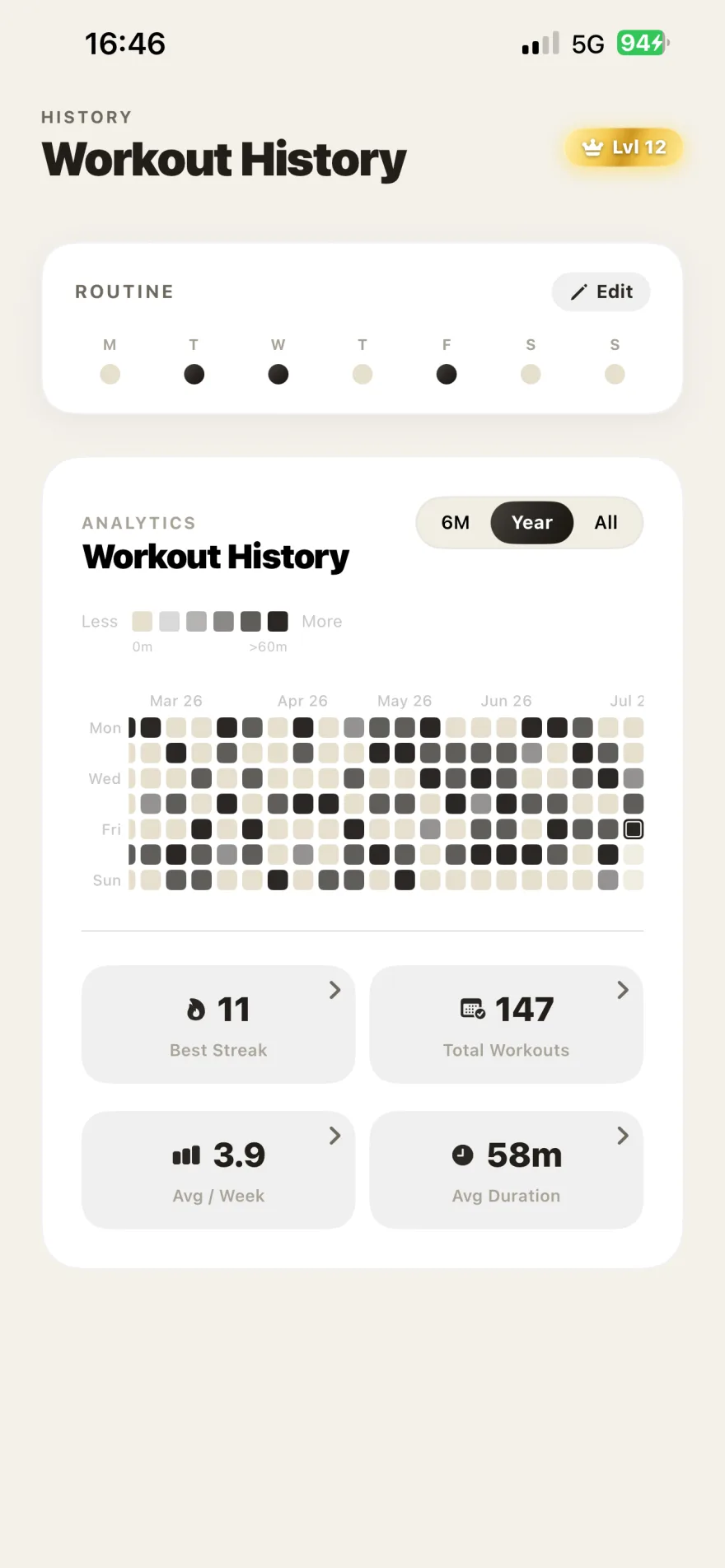
Full disclosure, since this is my app. GymRhythm is iPhone only, and while it's free to download, full access runs on a premium subscription. It tracks attendance, not exercises, so it replaces the habit grid, not your workout logger. If those constraints fit, the payoff is a contribution graph that stays truthful without you ever thinking about it.
Levels, streaks, and the rest of the graph
If the contribution graph hooks you, the rest of the gamification probably will too. GymRhythm treats attendance like a skill tree. Every logged visit earns XP across a 50-level journey, and the unlocks are real features rather than decorative badges. Advanced analytics and dark mode open up as you level.
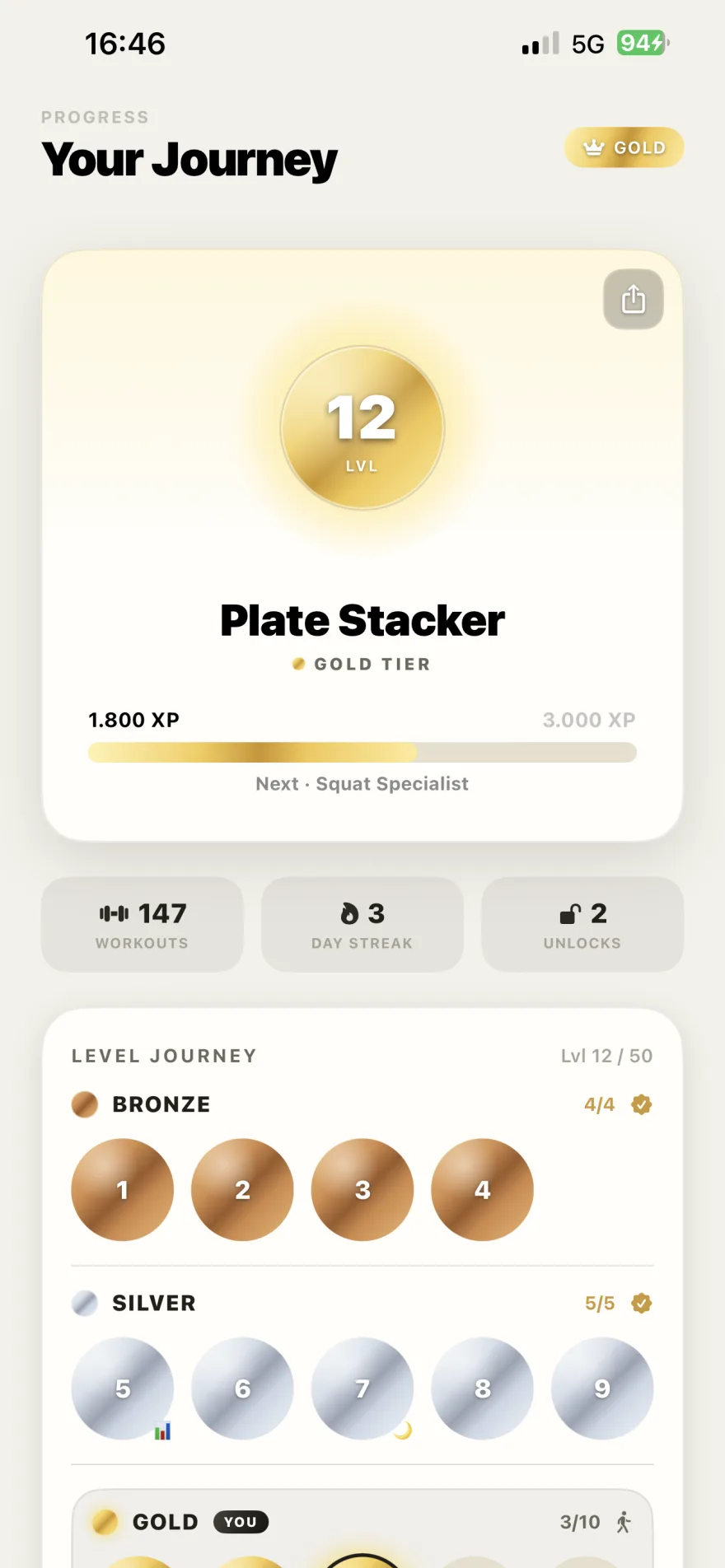
Streaks run on gym days too, paired with a weekly goal you set yourself, measured in days per week rather than sessions. Aim for three gym days, hit any three, and the week counts no matter which days they land on. That flexibility matters, because rigid daily streaks are exactly where most trackers flip from motivating to demoralizing. Whether three days a week is even enough is its own question, and for most people the answer is yes.
Because every session logs with arrival time and duration, the graph also comes with context the DIY versions never capture: your average session length, which weekdays you actually train versus the ones you planned to, and a full gym year in review you can share as a stat card when December rolls around.
So, to close the loop on the original question. A GitHub-style fitness tracker absolutely exists, in three flavors. Build one from open-source parts if the tinkering is half the fun. Use a manual grid app if you enjoy the check-in ritual and trust yourself to keep it honest. Or let geofencing do the committing, so your graph only ever measures the thing it should: whether you walked through the door. The green squares take care of themselves.