 GymRhythm
Does Apple Watch track gym visits? No. The Watch records workouts you start, plus a handful it can detect mid-activity, but it has no concept of a place. Apple Health knows your heart rate, your calories, and your workout durations. It does not know whether any of that happened at a gym, and it can't tell you how many times you went this month.
That surprises people, because the Watch feels like it tracks everything. This guide covers what it actually records, why attendance is missing from Apple Health, two workarounds you can build today, and the purpose-built way to get real visit tracking on the iPhone you already own.
What Apple Watch and the Fitness app actually record
Apple Watch is a body sensor, not an attendance system. When you start a workout, it logs:
- Workout type and duration, from the moment you press start to the moment you end it
- Heart rate and active calories throughout the session
- A GPS route, but only for outdoor workout types like running and cycling
Around those workouts, the Fitness app builds your Move, Exercise, and Stand rings, plus trends and award badges. All of it describes effort and physiology. None of it describes location, beyond the route line on outdoor sessions.
The Watch can also nudge you with "It looks like you're working out" for a few activity types, mainly walking, running, swimming, the elliptical, and the rower. Notably absent from that list: strength training. If you forget to start a workout during a lifting session, the Watch usually records nothing at all. Your rings might tick up from raw movement, but there's no workout entry, and definitely no note that you were at the gym.
Why "gym visits" isn't a metric Apple Watch tracks in Apple Health
Open Apple Health and browse the data types. You'll find hundreds, from VO2 max to time in daylight. You won't find "gym visits", and that's by design.
HealthKit, the database underneath Apple Health, models samples about your body and your activity. A workout entry has a start time, an end time, a type, and sensor data. It has no venue field. There's nowhere in the data model that a gym's name or address could even live.
There's a second reason: the Watch doesn't continuously log your location. That would drain the battery and raise privacy questions Apple clearly wants no part of. GPS switches on for outdoor workouts and switches back off. So even if Apple Health had a place for venues, the Watch usually wouldn't have the data to fill it.
The practical consequence: a strength workout in your living room and a strength workout at the gym look identical in Apple Health. Any app reading your Health data can count workouts. None of them can count visits.
And visits are often the number people actually care about. Showing up is the habit everything else gets built on, which is why gym days per week is such a useful consistency metric. If that's the goal you're chasing, our guide on building gym consistency as a system goes deeper on why attendance beats intensity, especially early on.
Workaround 1: manually starting a workout every time
The simplest fix is a personal rule: always start a "Traditional Strength Training" workout the moment you walk in, always end it when you leave. Your workout history then doubles as a rough visit log. Scroll it in the Fitness app on your iPhone and tally the entries.
It works, sort of. The failure modes:
- You have to remember, every single time. Strength training isn't auto-detected, so a forgotten start is a lost session. Miss a few and your history quietly stops reflecting reality.
- Home and gym sessions blur together. The tally counts every strength workout anywhere, which is not the same thing as gym attendance.
- The duration is the timer, not the visit. The walk from the locker room, the chat by the squat rack, the stretch at the end: whatever falls outside the window you pressed doesn't exist.
- The counting stays manual. No streaks, no weekly goal, no month-by-month picture. Just a list you scroll and add up yourself.
One honest aside. If what you really want is a record of the training itself, meaning sets, reps, and weights, a dedicated logger like Hevy or Strong is the right tool, and the Watch pairs well with both. We compare them in our guide to Hevy and Strong alternatives. But those are logbooks. They capture what you did once you're mid-workout, and they still depend on you opening them.
Workaround 2: Shortcuts location automations (and their limits)
The cleverer workaround uses Apple's own Shortcuts app. Create a personal automation with the trigger "When I arrive" at your gym's address, then attach an action: append today's date to a note, add a row to a spreadsheet, or fire yourself a notification.
This is genuinely close to the right idea, because it uses geofencing, the one mechanism on iPhone that actually detects presence at a place. In practice, people who build it hit the same walls:
- Confirmation prompts. For years, arrival automations couldn't run silently at all. Newer iOS versions offer a "Run Immediately" option, but plenty of setups still surface a notification you have to tap, and a tap you ignore is a visit that never gets logged.
- Reliability. The trigger can fire late, fire as you drive past on an errand, or occasionally not fire at all. You won't know it missed until you check the note days later.
- No duration. Arrival is half the story. To get session length you need a second "When I leave" automation, then you pair up the timestamps yourself.
- The output is raw. You end up with a column of dates. Streaks, weekly totals, and anything resembling a calendar view are all homework.
- One place per automation. Split your training between two gyms and you're building and maintaining parallel automations.
If you enjoy tinkering, it's a fun weekend build. As a system you'll still trust a year from now, it's fragile.
The purpose-built answer: geofenced visit detection
Here's how the three approaches stack up:
| Manual Watch workout | Shortcuts automation | Geofenced visit app | |
|---|---|---|---|
| What logs a visit | You remember to press start | Crossing a geofence, if the trigger fires and you confirm | Crossing a geofence you pinned once |
| Arrival time | No, only workout start | Yes, when it works | Yes |
| Visit duration | Workout timer only | Only with a second "leave" automation | Automatic |
| Streaks, goals, heatmap | No | No, raw dates in a note | Built in |
| Ongoing effort | Every single session | Setup plus upkeep per gym | One-time setup |
The Shortcuts hack proves the point. Geofencing is the right mechanism for tracking attendance, it just needs to be somebody's whole product instead of your side project. That's exactly what GymRhythm is, and since every Apple Watch owner carries an iPhone, every reader of this page can run it.
Setup takes about a minute. You drop a pin on your gym in a map view, adjust the detection radius so it hugs the building, and you're done. Train at more than one location? Pin multiple gyms. From then on, your iPhone notices when you arrive, logs the arrival time, and measures how long you stayed. No button to press, nothing to remember.
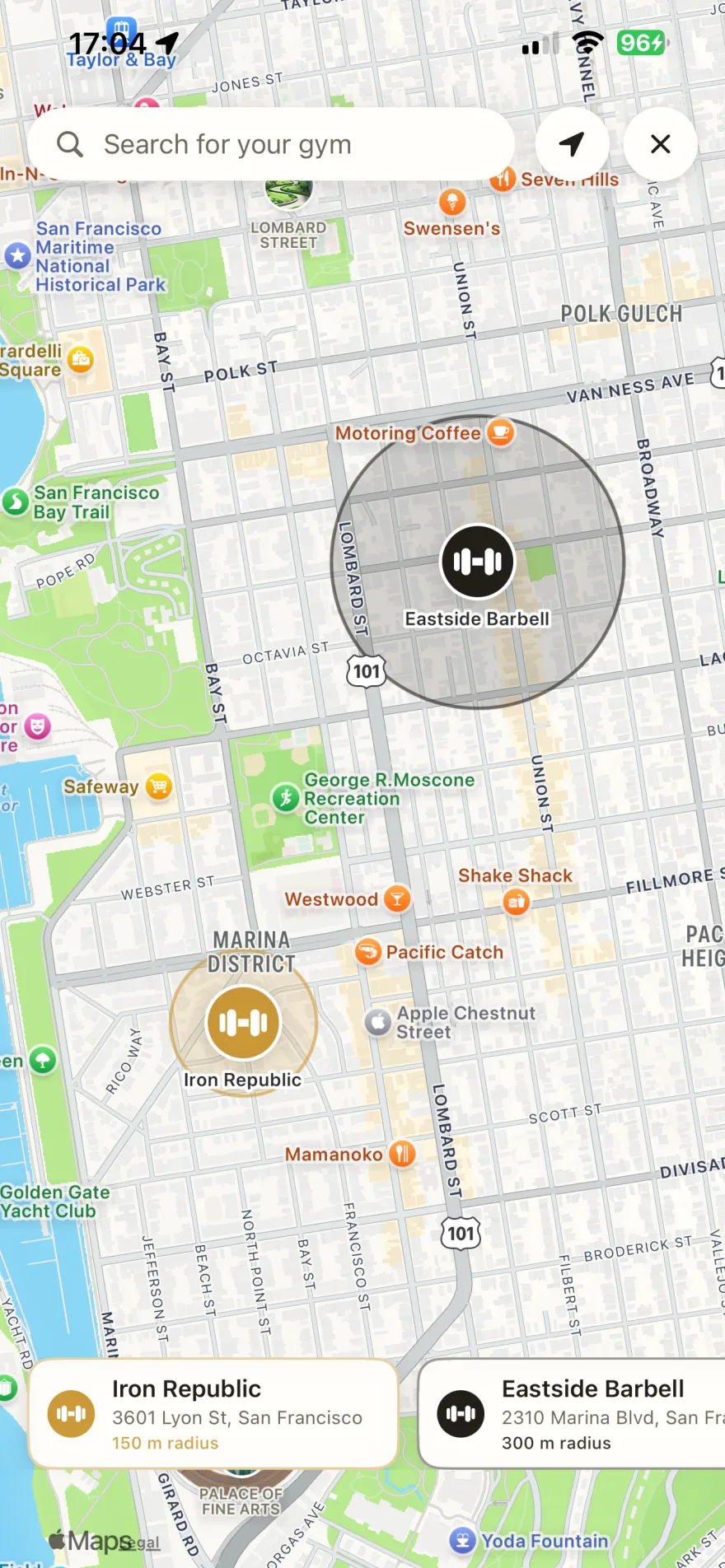
Two clarifications, in the interest of honesty. First, GymRhythm is an iPhone app. There's no Watch app, and it doesn't need one, because the geofencing runs on the phone that's already in your gym bag. Your Watch keeps doing what it's brilliant at: heart rate, rings, and workout detail. The two never conflict. Second, GymRhythm doesn't log exercises, sets, or weights. It tracks attendance. If you want a training logbook too, run it alongside Hevy or your Watch workouts.
The app is free to download on the App Store, with a premium subscription for full access.
What you get: visit history, streaks, and a year heatmap
Once visits log themselves, the numbers your Watch never had start to accumulate:
- A visit history with arrival time and duration for every session, plus your average session time
- Streaks and weekly goals measured in gym days per week, so two sessions in one day don't inflate the count. If you're wondering what target to set, we looked at whether three gym days a week is enough
- A GitHub-style year heatmap, with every visit as a green square and your whole year of showing up in one picture. More on that format in our guide to GitHub-style fitness tracking
- Routine insights that show which weekdays you actually train, not which ones you planned to
- 50 levels with real unlocks like advanced analytics and dark mode, plus shareable stat cards for when a milestone deserves an audience
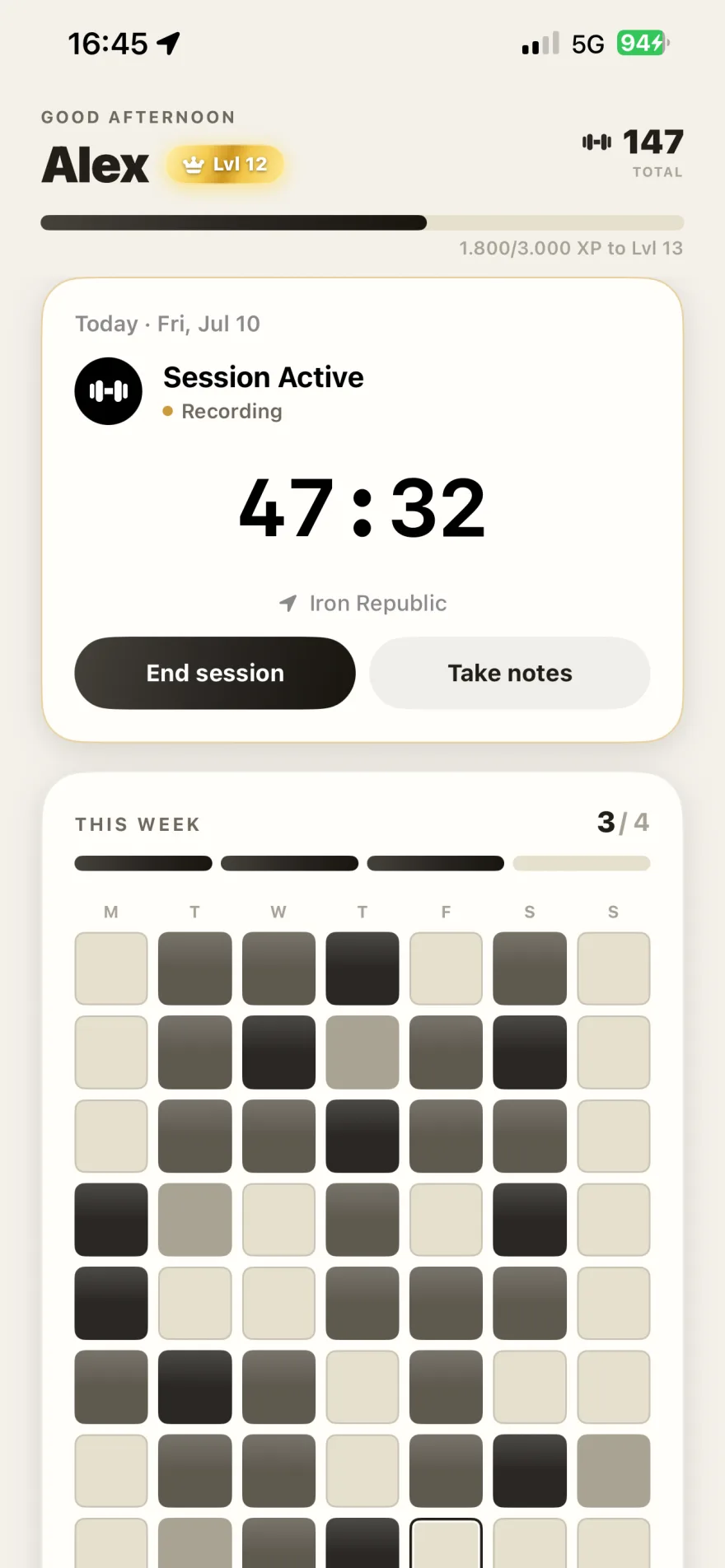
So, does Apple Watch track gym visits? No, and given how Apple thinks about health data and location privacy, it probably never will. Keep the Watch for what it does best, which is measuring effort and physiology. For attendance, the honest answer lives on your iPhone: a pinned gym, a geofence, and a log that fills itself in. And if you'd like to survey the whole landscape of options first, our iPhone guide to tracking gym visits automatically compares every approach side by side.